# CNT.US.11.1.Reportes de Contabilidad

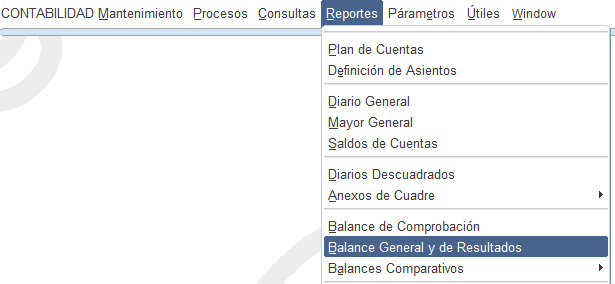
#### **Generar Balances General y de Resultados**

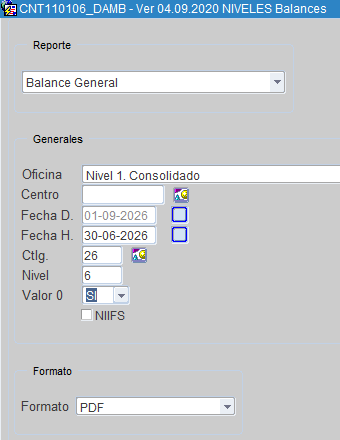
Parametrización de reportes de Balances General y de Resultados con nombres de firmantes con nombres de firmantes.

##### **Parametrizar Reportes**

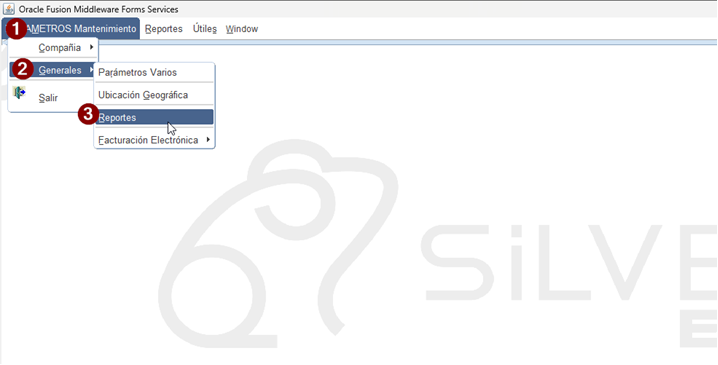
**<span lang="ES" style="font-family: 'Arial',sans-serif; color: black; mso-ansi-language: ES; mso-fareast-language: ES-EC;">Ruta: De Gobierno &gt; Normas del Negocio</span>**

[![image.png](https://manuales.s-innovatec.com/uploads/images/gallery/2026-09/scaled-1680-/image.png)](https://manuales.s-innovatec.com/uploads/images/gallery/2026-09/image.png)

**<span lang="ES" style="font-size: 11.0pt; font-family: 'Arial',sans-serif; mso-fareast-font-family: Calibri; mso-fareast-theme-font: minor-latin; color: black; mso-ansi-language: ES; mso-fareast-language: ES-EC; mso-bidi-language: AR-SA;">Parámetros Mantenimiento &gt; Generales &gt; Reportes</span>**

[![image.png](https://manuales.s-innovatec.com/uploads/images/gallery/2026-09/scaled-1680-/1ctimage.png)](https://manuales.s-innovatec.com/uploads/images/gallery/2026-09/1ctimage.png)

Ver la pantalla "Mantenimiento General de Reportes"

[![image.png](https://manuales.s-innovatec.com/uploads/images/gallery/2026-09/scaled-1680-/jopimage.png)](https://manuales.s-innovatec.com/uploads/images/gallery/2026-09/jopimage.png)
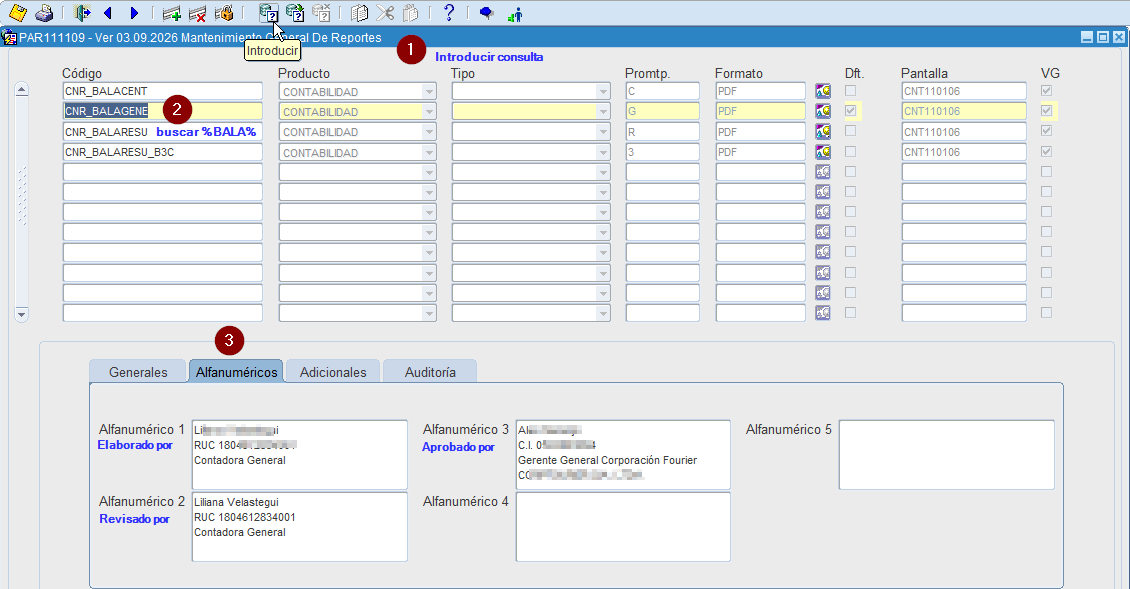
1. <span lang="ES" style="font-family: Arial, sans-serif; color: rgb(0, 0, 0);">Introducir consulta </span>
2. <span lang="ES" style="font-family: Arial, sans-serif; color: rgb(0, 0, 0);">buscar el nombre del reporte o una coincidencia por ejemplo: %BALA%</span><span lang="ES" style="font-family: Arial, sans-serif; color: rgb(0, 0, 0);">CNR\_BALAGENE</span><span lang="ES" style="font-family: Arial, sans-serif; color: rgb(0, 0, 0);">  
    CNR\_BALARESU</span>
3. <span style="color: rgb(0, 0, 0);"><span lang="ES" style="font-family: 'Arial',sans-serif; mso-fareast-font-family: 'Times New Roman'; mso-ansi-language: ES; mso-fareast-language: ES-EC;">Ubicarse en la pestaña de Alfanuméricos, i</span><span lang="ES" style="font-family: 'Arial',sans-serif; mso-fareast-font-family: 'Times New Roman'; mso-ansi-language: ES; mso-fareast-language: ES-EC;">ngresar en el campo  
    </span>Alfanumérico 1 &gt; Elaborado por  
    </span><span lang="ES" style="font-family: 'Arial',sans-serif; mso-fareast-font-family: 'Times New Roman'; mso-ansi-language: ES; mso-fareast-language: ES-EC;">Alfanumérico 2 &gt; Revisado por  
    </span><span lang="ES" style="font-family: 'Arial',sans-serif; mso-fareast-font-family: 'Times New Roman'; mso-ansi-language: ES; mso-fareast-language: ES-EC;">Alfanumérico 3 &gt; Aprobado por</span>

##### **Parametrizar Reportes**

[![image.png](https://manuales.s-innovatec.com/uploads/images/gallery/2026-09/scaled-1680-/7maimage.png)](https://manuales.s-innovatec.com/uploads/images/gallery/2026-09/7maimage.png)

[![image.png](https://manuales.s-innovatec.com/uploads/images/gallery/2026-09/scaled-1680-/iGZimage.png)](https://manuales.s-innovatec.com/uploads/images/gallery/2026-09/iGZimage.png)
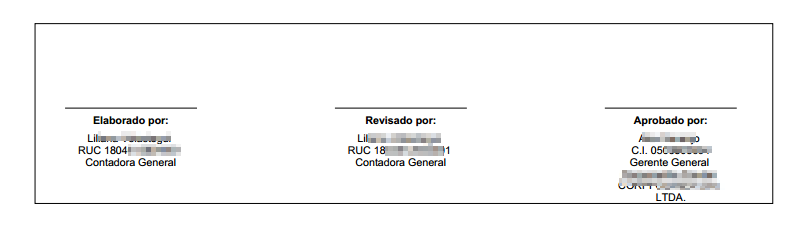
Ejemplo reporte ie de página reporte "BALANCE GENERAL"

[![image.png](https://manuales.s-innovatec.com/uploads/images/gallery/2026-09/scaled-1680-/8QHimage.png)](https://manuales.s-innovatec.com/uploads/images/gallery/2026-09/8QHimage.png)